USB Tv Connector
- 4.6
- Rating
- 10.00K
- Installs
- Free
- Price
 Analysis by App-foxy
I approached USB Tv Connector as a practical utility rather than a full entertainment platform. Its purpose is straightforward: help move content from a phone to a television through a USB connection. That makes it interesting for people who want a wired route instead of relying entirely on wireless casting, but it also means the quality of the experience depends heavily on the phone, television, cable, and connection method being used.
In my experience, the most important question is not simply whether you want to cast. It is whether a USB-based connection suits your particular setup. If your television already handles wireless casting smoothly, this app may feel unnecessary. If wireless discovery is unreliable, the television is older, or you prefer a physical connection for a particular viewing session, it can be a useful option to test.
How I judged USB Tv Connector
I looked at the app as someone deciding between several ways to get phone content onto a larger screen. The usual choices are built-in casting, a television manufacturer's companion app, a dedicated streaming device, a wired adapter, or a USB-focused connector utility such as this one. Each category solves a slightly different problem, so I paid attention to setup effort, everyday convenience, compatibility expectations, and how much patience the user needs when something does not connect immediately.
You May Also Like

 AccuWeather: Weather Radar
AccuWeather Review: A Quick, Clear Forecast for Everyday Decisions
For everyday plans, the best forecast is the one you can understand quickly. AccuWeather makes rain timing, radar, and local conditions easy to act on, with a few trade-offs.

 Hill Climb Racing
Why Hill Climb Racing Still Turns Crashes Into One More Run
A tiny car, a bumpy hill and one more upgrade: Hill Climb Racing keeps resurfacing because its simple chaos makes every near-miss feel personal.

 AliExpress - Shopping App
AliExpress Makes Global Shopping Feel Personal, but Shoppers Bear the Risk
AliExpress turns a global marketplace into a pocket-sized discovery engine. Its reach is useful, its shopping loop compelling, and its trade-offs easy to miss.

 Lords Mobile: Kingdom Wars
Lords Mobile Is a Kingdom-Building Routine, Not a Quick Match
A case-by-case verdict on the building, battles, device demands, and social commitments that make Lords Mobile rewarding for some players and exhausting for others.

 PDF Scanner app - TapScanner
TapScanner Makes Paperwork Easier to Capture, Check, and Share
TapScanner makes scanning with a phone feel less like a rescue operation and more like a dependable step in getting work done. Its capture tools are useful, though not flawless.

 Block Blast!
 Shows How Much a Puzzle Game Can Leave Out
A quiet grid game shows why puzzle players increasingly value instant clarity, repeatable skill and low-pressure play—and where the genre still needs to catch up.
More From Our News Desk
View All News


USB Tv Connector is listed in the Libraries & Demo section, which fits its role as a demonstration and connection-oriented tool rather than a media library or streaming subscription. Syscraft Labs is the developer behind it. The app is free to install, carries an Everyone age rating, and supports Android devices running version 7.0 or later. Those details make it approachable for a broad range of Android users, including people with older phones that cannot run many newer utilities.
The app has a 4.6 average from around five hundred ratings and has passed ten thousand installs. That gives me some confidence that the basic idea is useful to a real group of users, while still reminding me not to treat it as a universal solution. A rating cannot guarantee that a particular phone and television combination will behave well. USB connections are especially dependent on hardware compatibility, cable quality, and what the television expects from its USB ports.
The first decision: what are you trying to display?
Before installing it, I would separate simple local viewing from protected or service-based content. Showing photos, personal videos, or other files stored on a phone is a different task from mirroring an app that may restrict external display. A connector utility can make the physical link easier, but it cannot automatically remove limitations imposed by the phone, television, or content provider.
This distinction matters in everyday use. If I want to show a family video recorded earlier that day, a wired connection may be perfectly sensible. If I expect every streaming service, game, or app to appear exactly as it does on the phone, I would choose a solution only after checking that the television and phone support that kind of output. USB Tv Connector should be viewed as a bridge for a compatible setup, not as a promise that every screen can be mirrored in every situation.
Why the wired approach can be appealing
Wireless casting is convenient when both devices discover each other quickly and remain on the same network. When that condition fails, the experience becomes frustrating: the television may not appear, the connection may drop, or another device may be selected by mistake. A wired workflow can reduce that particular kind of uncertainty because the phone and television are physically linked.
For me, the strongest case is a temporary viewing session in a room where I do not want to troubleshoot network settings. I can imagine using it to show holiday photos at a relative's house, play locally stored clips during a presentation, or view phone content on a larger screen when the television's wireless features are limited. The value is less about adding a new entertainment catalog and more about offering another route to the display.
Where USB Tv Connector makes the most sense
The app's clearest advantage is its focus. It does not ask me to think of the phone and television as separate ecosystems that must be managed through several menus. Instead, it presents itself as a connector utility for a USB-based cast workflow. That narrow purpose can be helpful for a user who does not want a large companion platform filled with remote-control features, recommendations, accounts, or unrelated media tools.
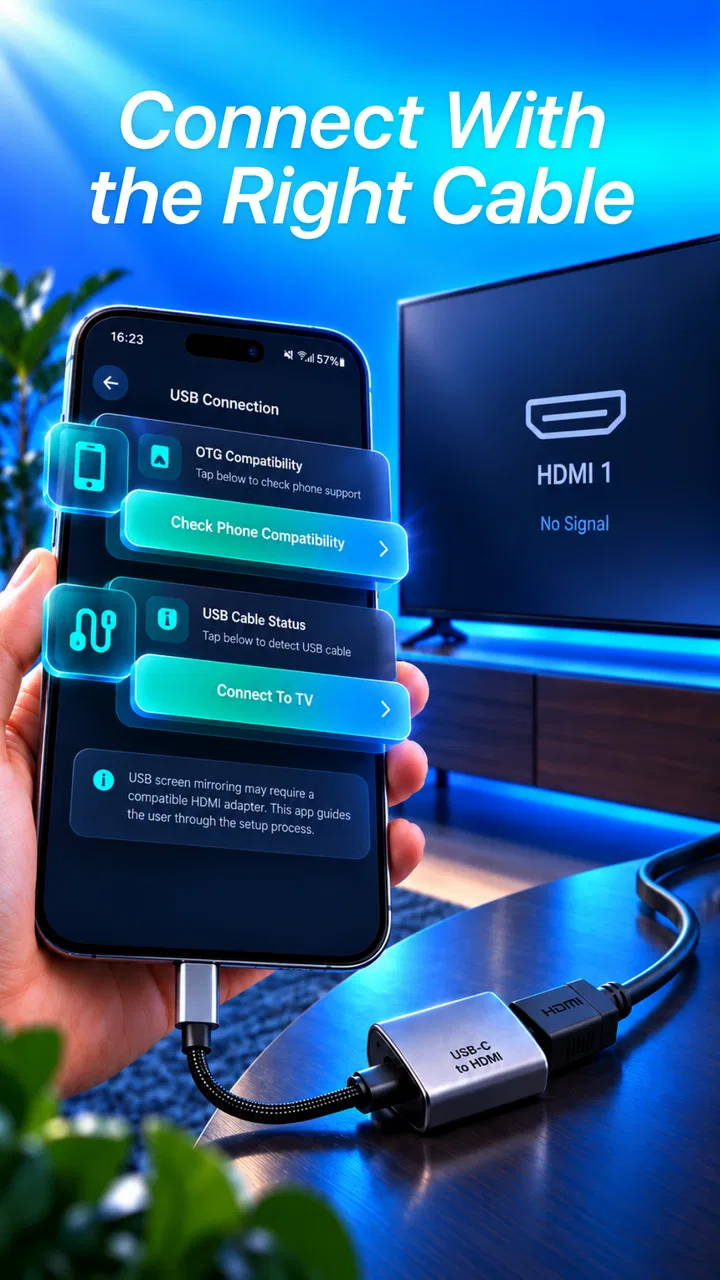
Another benefit is the low entry barrier. Because the app is free, I can test it before spending money on a dedicated streaming device or a more elaborate adapter setup. That does not remove the need for compatible hardware, but it makes the decision less risky. I would still check the physical ports and cable arrangement first rather than assuming that any USB cable will carry the right kind of display signal.
A realistic everyday scenario
Imagine I am visiting a family member with an Android phone and a television that is not cooperating with wireless casting. I want to show a folder of recorded videos after dinner. Instead of asking everyone to join a network, restart the router, or search through the television's casting menu, I can try a USB connection and use the app as the starting point for the display workflow.
The useful part of that scenario is not speed alone. It is predictability. I know where the phone is, where the cable is connected, and which television input I am testing. If the image appears, the session can remain simple. If it does not, I have learned that the setup needs a different adapter, input, or display method rather than wasting time repeatedly searching for a wireless device.
Three practical habits that improve the experience
First, I would identify the television input before opening the app. A television can have several USB ports, but their roles may differ, and a USB port intended for storage or power is not automatically a video input. Checking the television's input options and manual can save more time than repeatedly reconnecting the phone.
Second, I would keep the phone unlocked during the initial connection and avoid starting with a long video or an important presentation. A short local clip or a few photos are better for confirming that the connection is functioning. This staged approach separates setup problems from content problems and gives me a quick way to stop without disrupting anything important.
Third, I would treat the cable as part of the troubleshooting process, not as an invisible accessory. Some cables are designed mainly for charging, while others support data transfer or different forms of output. If the app opens but the television shows nothing, changing the cable or adapter may be more useful than changing app settings. This is one of the key trade-offs of a USB solution: the software may be simple, but the physical path matters greatly.
What the current release suggests
The current version is 157.0.0, so the project is not presented as an abandoned experiment. I appreciate seeing an actively maintained release identifier, especially for a utility that sits between two different pieces of hardware. Still, a version number alone does not guarantee compatibility with every recent television or phone. I would install it with realistic expectations and test the exact combination I plan to use.
Because the minimum operating system is Android 7.0, people with older compatible phones may have a chance to use it without upgrading immediately. That is helpful in households where an older phone has become the device used for photos, family videos, or simple demonstrations. On the other hand, an older phone may have its own hardware restrictions, so operating-system support should not be confused with guaranteed display-output support.
Where other approaches may fit better
USB Tv Connector is not automatically the best choice for every casting situation. If my main goal is watching services that already support a television's built-in casting system, the native wireless option may be easier. It usually avoids cables and lets me control playback from the phone without keeping the handset physically connected to the television.
A television manufacturer's app may also be preferable when I want more than screen sharing. Such apps can be designed around a particular television family, which may make remote control, input switching, or device discovery feel more integrated. I would choose that category when the television is modern and its official tools are working reliably.
A dedicated streaming device is a better fit when I want a permanent living-room setup. It can be more convenient for repeated viewing because the television becomes the main destination rather than an occasional screen for the phone. The trade-off is that it adds another device, another remote, and potentially another setup step. USB Tv Connector is more appealing when I want to try a lightweight, phone-centered solution first.
A physical display adapter may be the stronger choice for work presentations, gaming, or situations where I need a dependable wired signal and the phone officially supports that output method. The app can help with a compatible USB casting workflow, but it should not be treated as a replacement for hardware that performs signal conversion. If the phone or television requires a specific adapter standard, buying the correct adapter is more important than installing multiple connector apps.
Who should skip it
I would skip this app if I only want effortless wireless playback and my existing television already appears instantly in the phone's cast menu. In that situation, adding a USB cable introduces a physical connection without solving a real problem. I would also hesitate if I need to mirror every protected streaming app, since external-display restrictions can remain even when the connection itself is technically correct.
It is also not ideal for someone who expects the television's USB port to behave like a universal video input. The app cannot change the capabilities of a port that was designed only for power or file access. Before relying on it for an event, I would perform a complete test with the exact phone, television, cable, and content type. That small preparation is especially important for presentations or travel, where there may be no time to find an alternative.
Questions I would answer before switching
Would I need internet access? I would not assume that a USB connection makes every kind of content independent from the internet. Local files may be a good test case, but online services can still need connectivity and may apply their own playback rules. The physical link addresses the display path; it does not automatically replace the network requirements of an online app.
Can I use any television? No, I would not make that assumption. The television must be able to accept the kind of signal produced by the phone and connection hardware. A USB socket alone is not enough evidence. I would look for the relevant input option and test the setup before treating the app as a dependable solution.
Can I leave the phone connected for a long viewing session? Possibly, but I would consider comfort, battery behavior, cable length, and whether I need the phone for something else. A wired setup can keep the phone physically tied to the television, which is useful for stability but less convenient than wireless control. For short demonstrations, that trade-off is minor; for several hours of viewing, it becomes more noticeable.
Is there a paid upgrade? The app is free, while in-app purchases are listed at $9.99 per item. I would check the purchase screen carefully before confirming anything and first determine whether the free experience handles my intended setup. That matters because the value of this type of utility depends on compatibility more than on the number of optional functions it may offer.
The cost of changing from a familiar casting method
Switching from wireless casting to USB is not only a software decision. I would need to change my physical routine, keep a suitable cable available, select the correct television input, and accept that the phone may remain occupied during playback. In return, I may gain a more direct path when network discovery is the part causing trouble.
The reverse is also true. If I start with USB and later move back to wireless casting, I regain freedom to use the phone while content plays and reduce cable clutter. The best choice depends on what I value in that moment: fewer network variables or fewer physical constraints. USB Tv Connector is most convincing when the former problem is more irritating than the latter.
I would make the switch gradually rather than replacing my usual method immediately. I would test a short local video, then a group of photos, and only afterward try the content I actually care about. This workflow gives me a practical answer without assuming that a successful connection with one file type proves that every app will behave the same way.
My recommendation
I recommend USB Tv Connector as a sensible first experiment for Android users who specifically want to explore a USB-based route from phone to television. Its free entry point, Everyone rating, broad Android version support, and focused purpose make it easy to try. Syscraft Labs has kept the app in a current release, and its strong average rating suggests that the concept has found an audience.
My recommendation is conditional, though. I would choose it for local photos, personal videos, demonstrations, and awkward situations where wireless casting is unreliable. I would not choose it as a guaranteed replacement for a dedicated streaming device, a television's official companion app, or a certified display adapter. Those alternatives can be better when I need permanent convenience, specialized television control, or predictable support for demanding display tasks.
The most useful way to approach USB Tv Connector is as a compatibility test with a practical purpose. Install it, prepare the right cable, select the correct television input, and begin with simple local content. If that workflow works smoothly, the app can be a handy addition for occasional wired viewing. If it does not, the result still points me toward the real issue: the hardware or display standard may need attention rather than another round of app switching.
For my own decision, I would keep it available as a backup rather than make it my only casting method. That is where it offers the best balance. It is most valuable when a simple physical connection solves a specific problem that wireless casting has not solved cleanly. Users who understand that boundary are the ones most likely to find it worthwhile.
FAQs for USB Tv Connector
01What is USB TV Connector and how does it work?
USB TV Connector is an app designed to enable users to connect their Android or iOS devices to a TV via a USB cable. It works by utilizing the phone’s USB port to transmit audio and video signals to the TV, allowing users to enjoy media on a larger screen. The app often requires compatible hardware and may need additional settings adjustments for optimal performance.
02Is USB TV Connector compatible with all devices and TVs?
Compatibility varies between devices and TVs. Most modern smartphones and smart TVs support USB connections, but older models might not. It's essential to check if your device supports USB OTG (On-The-Go) and if your TV has a compatible USB port. The app description usually provides details about supported devices.
03Are there any additional accessories required to use USB TV Connector?
While the app itself is straightforward, users typically need a USB cable compatible with their device’s port (such as USB-C or Micro USB) and possibly an adapter for certain connections. Some setups might require additional hardware, like an HDMI adapter, to ensure proper connectivity between the device and the TV.
04Does using USB TV Connector affect the quality of the video and audio?
The quality of video and audio largely depends on the USB cable and the device’s capabilities. High-quality cables generally provide better transmission, while older devices might not support high-definition outputs. Users should ensure their equipment is capable of supporting the desired quality for optimal experience.
05Is USB TV Connector easy to set up and use for beginners?
Yes, USB TV Connector is designed with user-friendliness in mind. The setup typically involves connecting the device to the TV with a USB cable and following on-screen instructions. The app may provide a step-by-step guide or prompt users through the process, making it accessible even for those with limited technical expertise.
Pros
- Easy to set up and use with simple instructions.
- Supports multiple video formats seamlessly.
- Compatible with a wide range of devices.
- Offers high-quality audio and video output.
- Lightweight app with minimal storage usage.
Cons
- Some features require a stable internet connection.
- Limited compatibility with older TV models.
- Occasional lag during high-definition streaming.
- Ads can be intrusive during usage.
- Requires frequent updates for optimal performance.

USB Tv Connector
Gallery